The slicer stores numbers.
FilamentPilot saves experience.
Anyone who prints seriously knows it: the real know-how lives in your head — which build plate, which adhesive, which nozzle. FilamentPilot is your personal experience archive — saved, searchable, shareable. As a beta tester you get the full Workshop licence free for 60 days.
The problem
“How was that again?”
Manufacturer datasheets list melting temperatures and ISO norms. But nobody answers the questions you actually need:
This knowledge is in your prints. FilamentPilot puts it on the card.
✗ Without FilamentPilot
- ✗ Build plate and adhesive: trial and error every time
- ✗ Drying time: somewhere in a forum — or nowhere
- ✗ After a 3-month break: start over from scratch
- ✗ Second printer, second PC: knowledge out of sync
- ✗ Failed prints from forgotten settings
- ✗ No shop link anywhere when the spool runs out
✓ With FilamentPilot
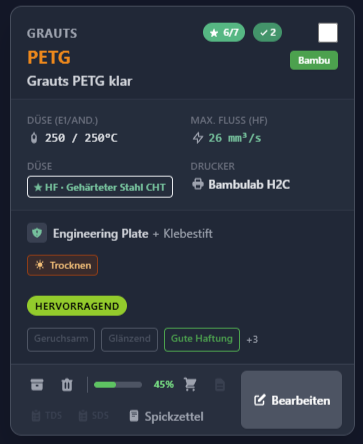
- ✓ Build plate, adhesive, nozzle: at a glance
- ✓ Your own drying notes right next to the spool
- ✓ All your experience saved for good — available even months later
- ✓ Every PC reads the same database (Workshop)
- ✓ Your team shares knowledge via one network folder
- ✓ Shop link per filament — reorder in one click
Features
Everything you need —
nothing you don’t.
From the experience database to the slicer hub: FilamentPilot thinks ahead.
Your experience archive
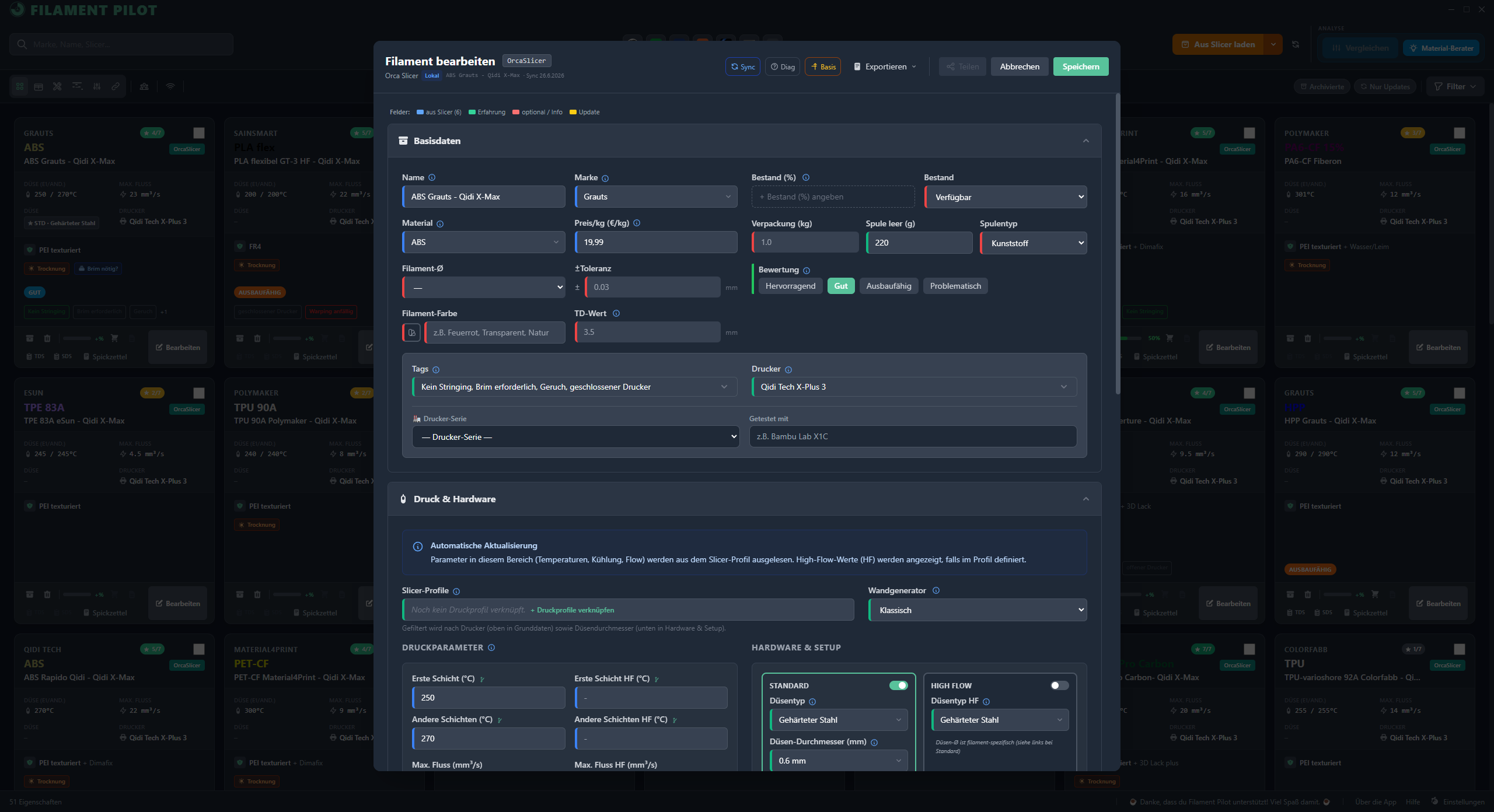
Build plate, adhesive, nozzle, drying, notes — all right next to the spool. Never start from scratch again.
Cheat sheet, not datasheet
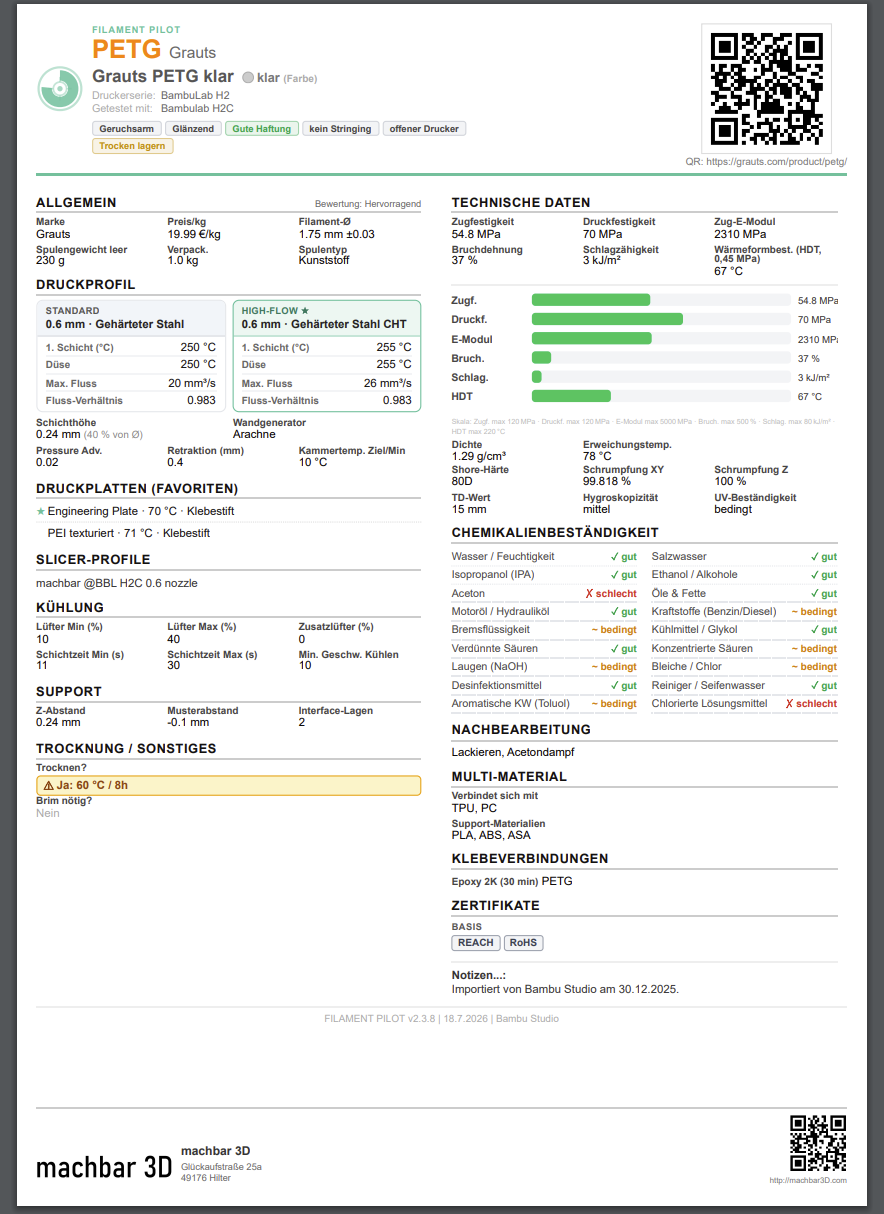
One A5 page replaces the multi-page manufacturer datasheet. All the values that matter, a QR code for reordering and a radar chart — print-ready.
Personal & Workshop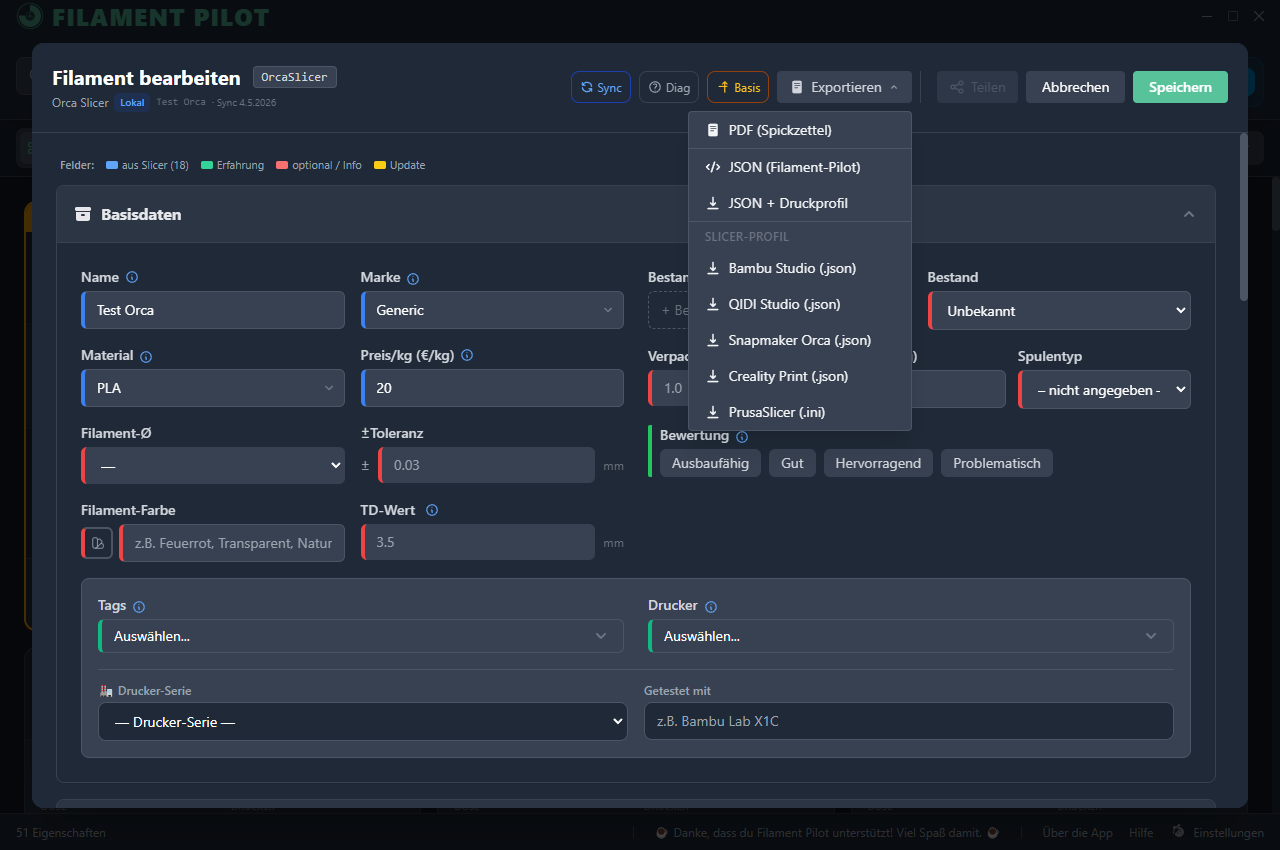
Cross-slicer export
Whether you created it yourself, imported it from a slicer or loaded it from a manufacturer: FilamentPilot writes the ready-made profile from any filament card straight into your slicer’s folder — Bambu, Orca, Prusa, QIDI, Snapmaker Orca and Creality Print. No manual transfer, no typos.
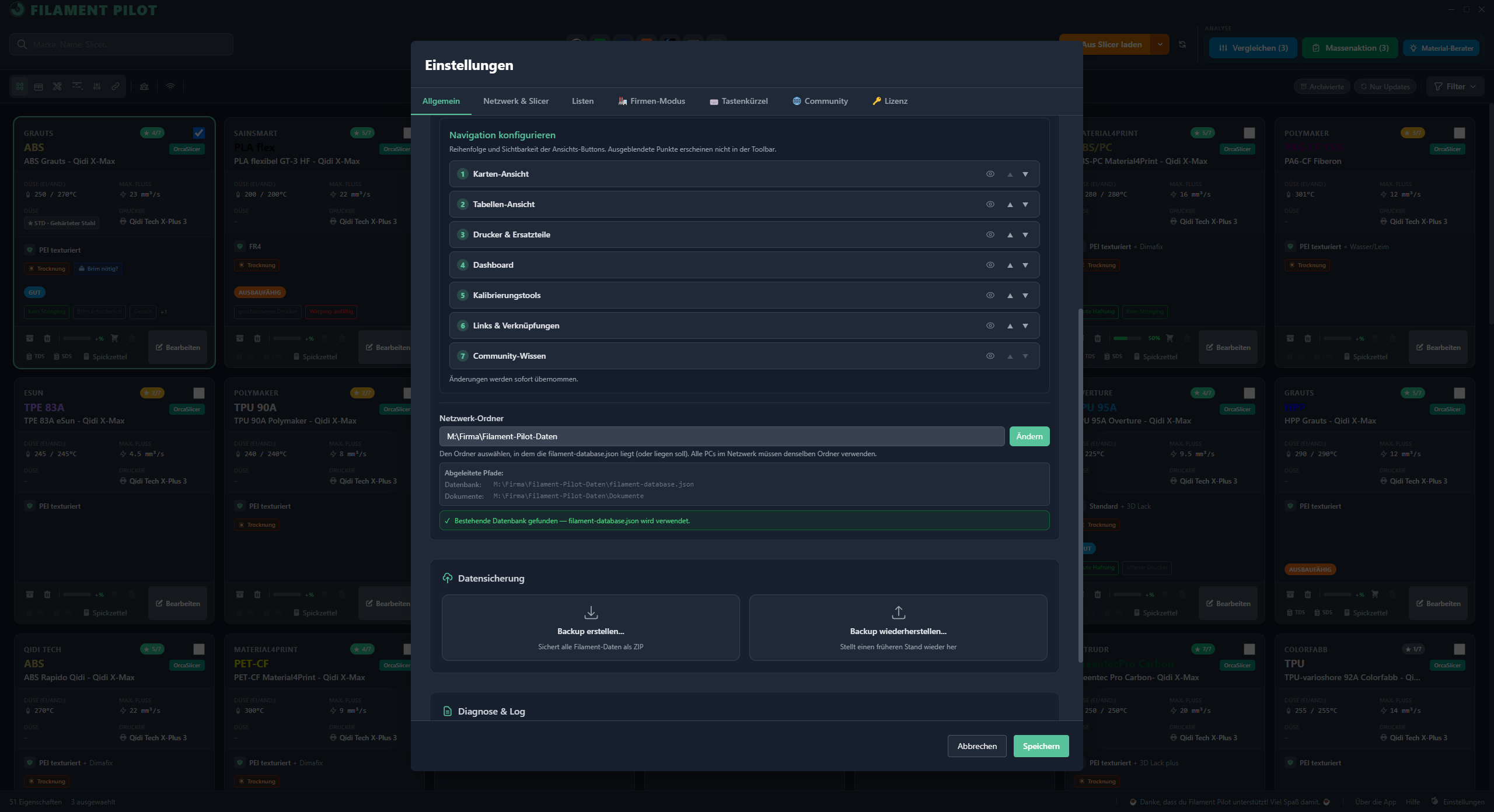
Shared network folder — no cloud
One shared network folder on a NAS, router or USB stick, every PC points to it. All workshop PCs automatically work from the same data — filaments, printers, spare parts, links and documents. Local, your data stays with you.
Workshop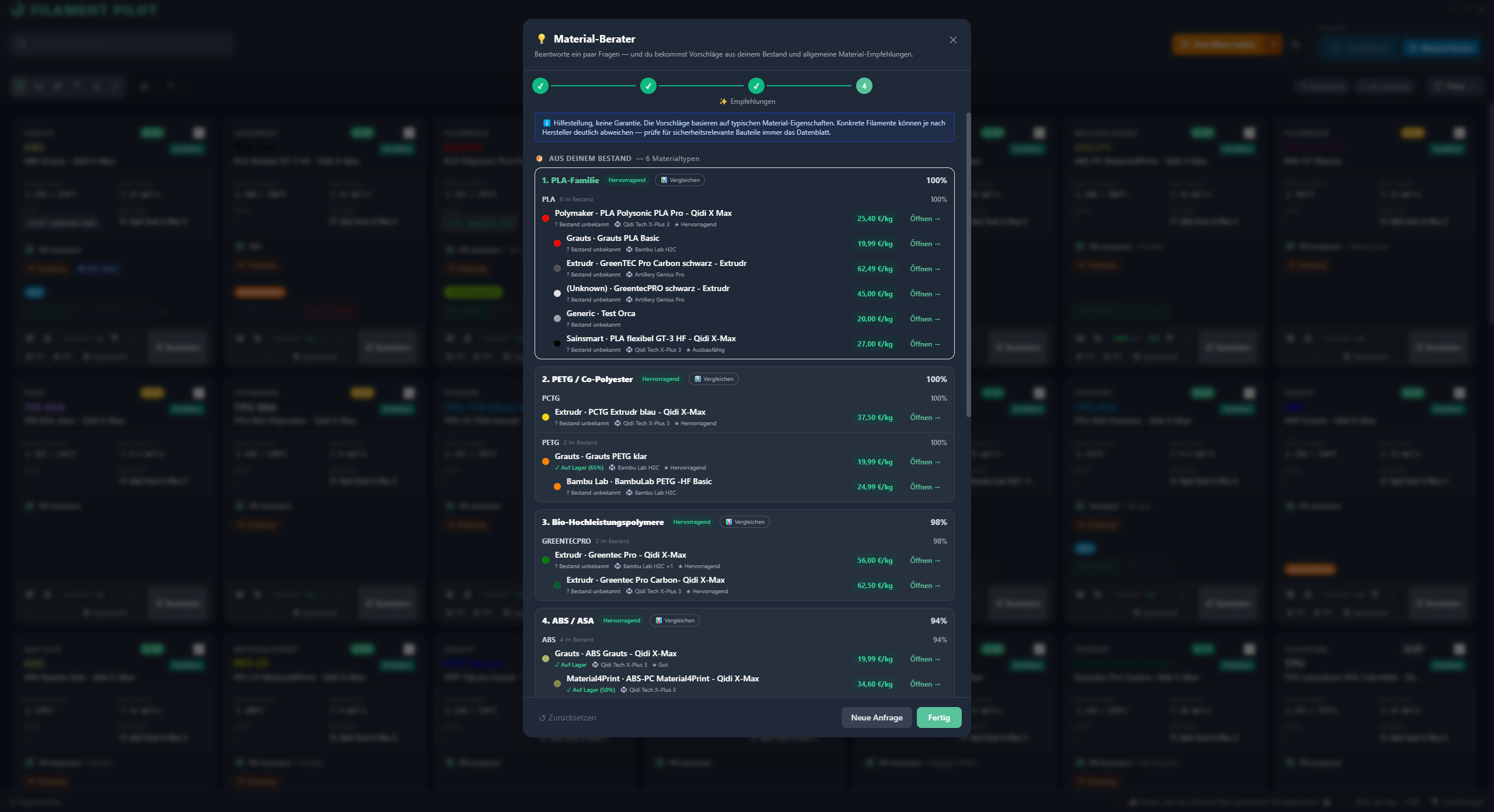
Material advisor
Requirement-based recommendations from your own filament database — which material fits your project? No more guessing, no search engine needed.
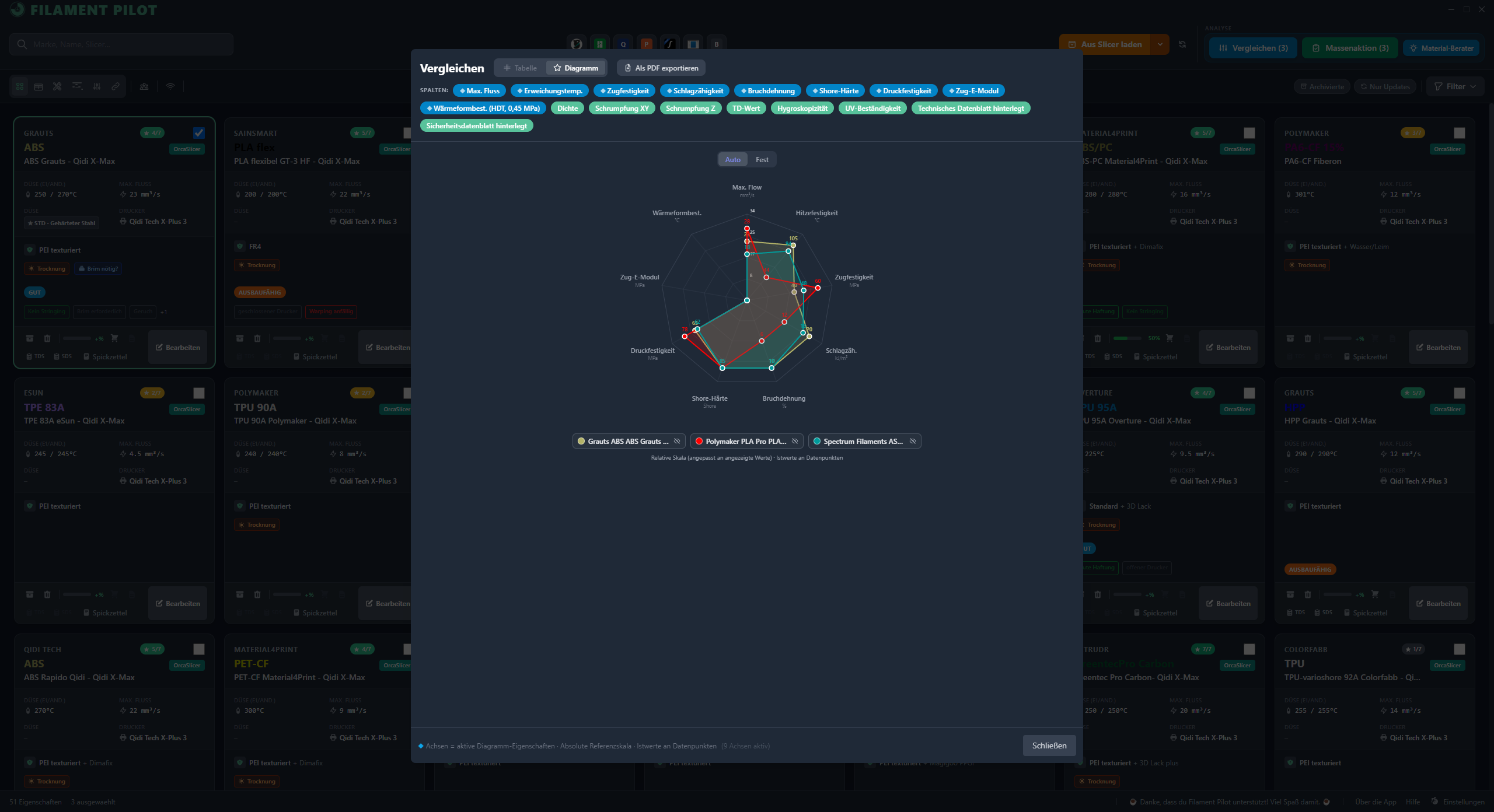
Material comparison
Radar charts and a direct side-by-side comparison of several filaments — including a print-ready comparison datasheet PDF with all technical values.
Personal & Workshop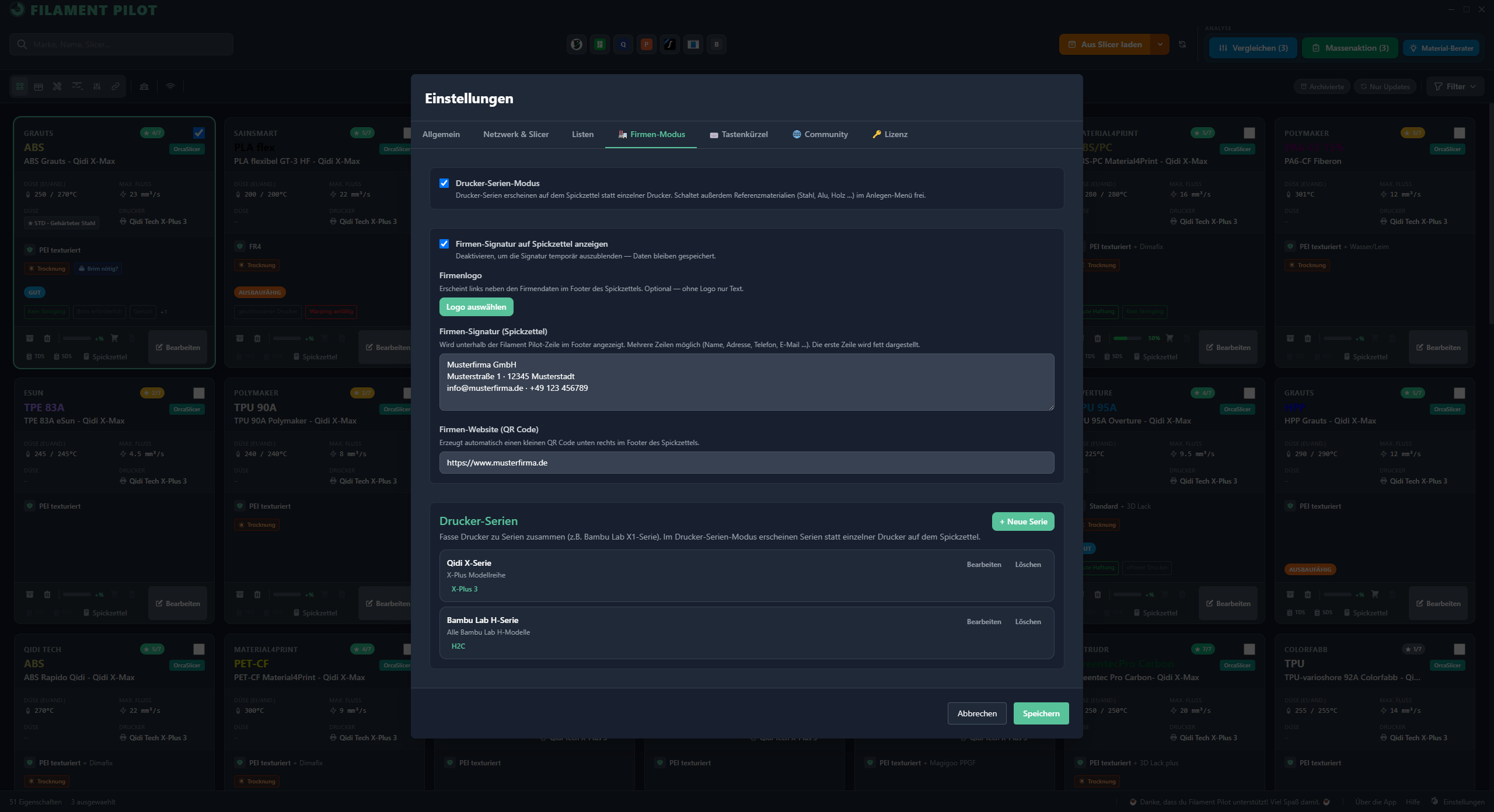
Manufacturer mode
Printer series instead of single printers on the cheat sheet — plus a company footer with logo, signature and QR code. Ideal for schools, FabLabs and manufacturers.
Workshop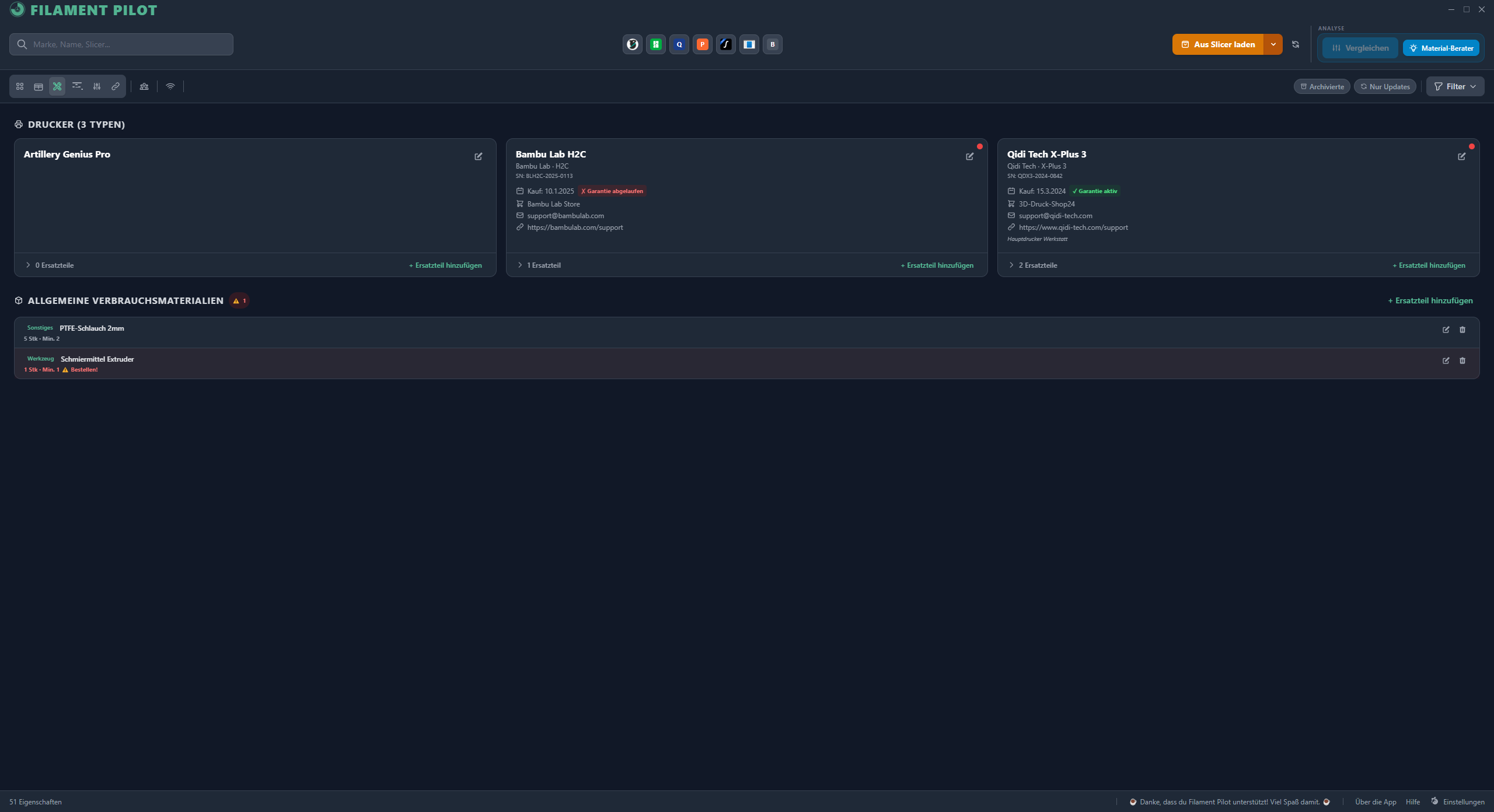
Printers & spare parts
Every printer with model, warranty, dealer and support contact. Spare parts with minimum stock, shop link and replacement date. The app warns you before you run out of a part.
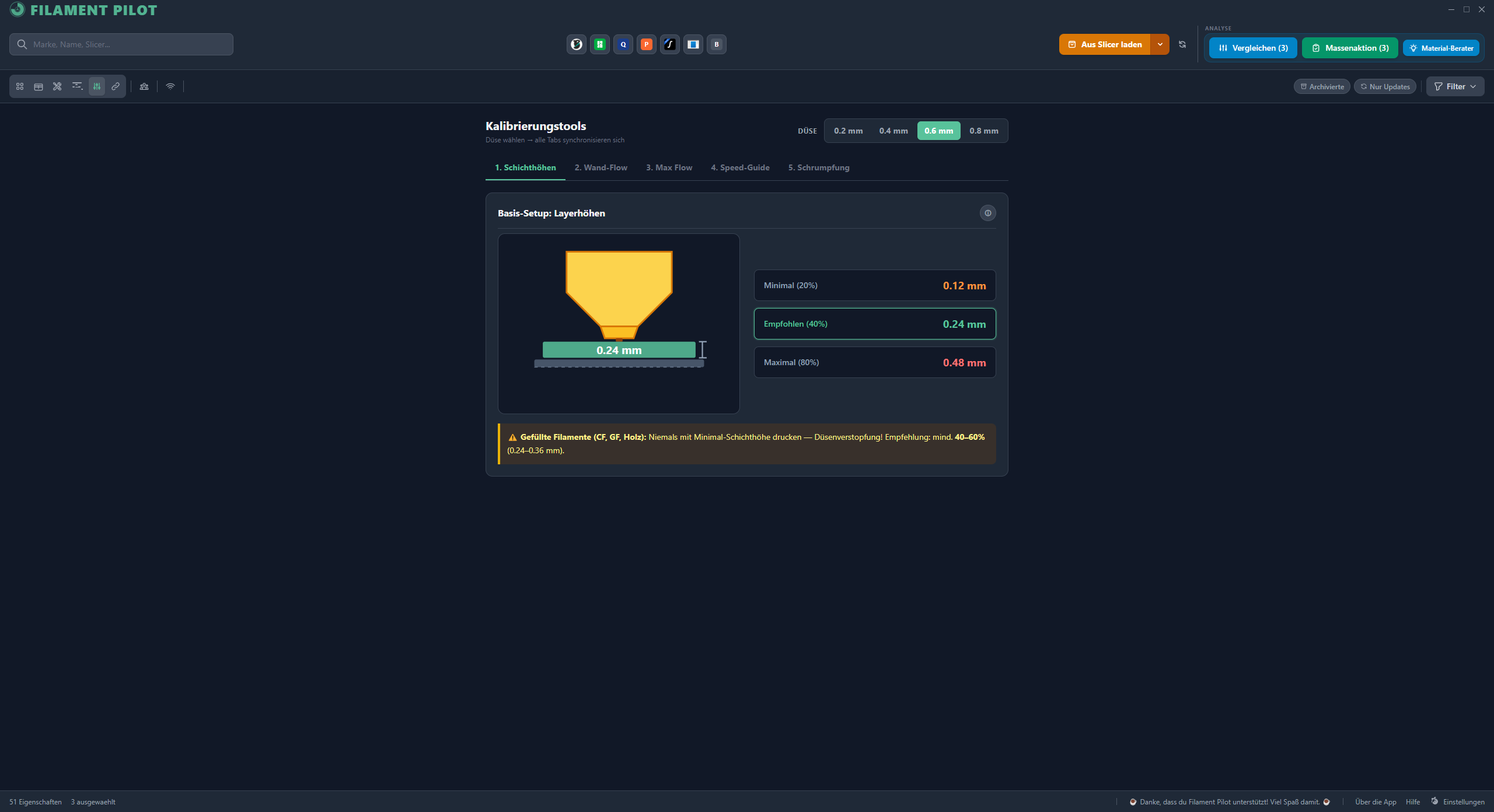
Calibration tools
Wall flow, MVS limit, speed guide and shrinkage — fully offline, no external tools. Print a test cube, enter the values, get your correction factor.
Links & documents
Per filament: shop link (with QR code), technical (TDS) and safety data sheet (SDS). Per printer: support email, URL and dealer. Everything right where you need it.
For filament manufacturers: Give your customers a ready-made JSON profile. Your users import it into FilamentPilot — no more endless support requests about print settings.
Make it yours
Your software. Your workflow.
Everyone prints differently — FilamentPilot forces nothing on you. Turn features on or off, show only what you need and hide the rest. Cards or table, dark or light, German or English. And whatever you set up once stays exactly that way.
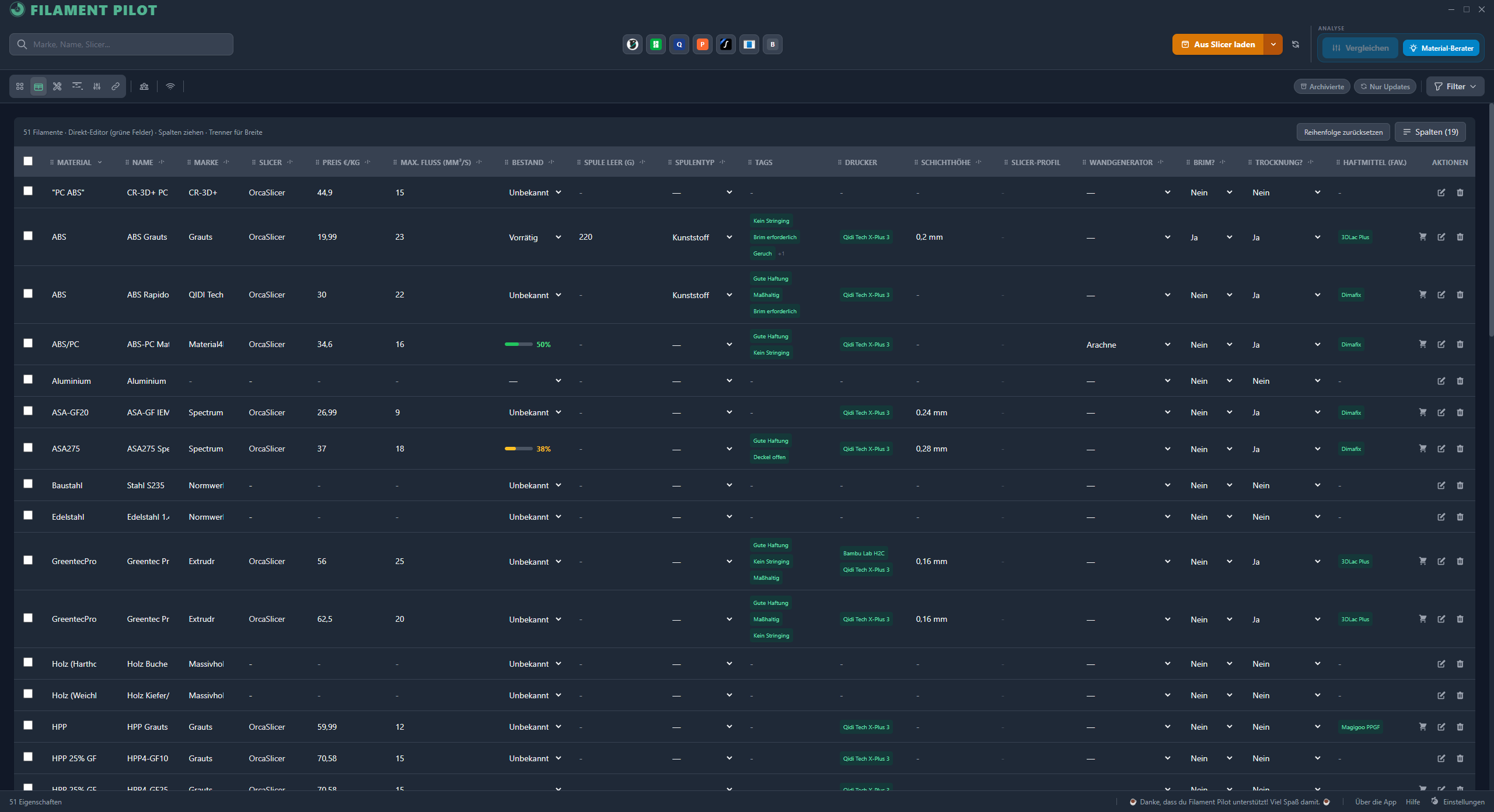
Table view with up to 17 configurable columns — click to enlarge
Datasheet vs. cheat sheet
The datasheet jungle
becomes one cheat sheet.
A datasheet is full of ISO norms and temperature ranges — but not built to help you at the printer. FilamentPilot bundles everything that matters onto a single page with clear, self-tested values. Print it, pin it up, get going.
| PHYSICAL PROPERTIES | Value | Unit | Standard |
|---|---|---|---|
| Density | 1.29 | g/cm³ | ISO 1183 |
| Water absorption (24 h) | 0.3 | % | ISO 62 |
| Moisture absorption (23 °C / 50 % r.h.) | 0.4 | % | ISO 62 |
| Warpage (plate 91×91×2 mm) | 0.3 / 0.3 | mm | internal |
| Vicat softening (VST/B/50) | 70 | °C | ISO 306 |
| MECHANICAL PROPERTIES | Value | Unit | Standard |
|---|---|---|---|
| Tensile impact strength (+23 °C) | 3.5 | kJ/m² | ISO 8256 |
| Charpy impact strength (+23 °C) | 5.3 | kJ/m² | ISO 179-1/eU |
| Charpy notched (−23 °C) | NB | kJ/m² | ISO 179-1/eU |
| Tensile modulus | 1900 | MPa | ISO 527 |
| Elongation at break | 37 | % | ISO 527 |
| Flexural strength | 54.8 | MPa | ISO 178 |
| Flexural modulus | 2100 | MPa | ISO 178 |
| THERMAL PROPERTIES | Value | Unit | Standard |
|---|---|---|---|
| Vicat softening temp. (VST/B/50) | 70 | °C | ISO 306 |
| HDT (1.80 MPa) | 64 | °C | ISO 75 |
| HDT (0.45 MPa) | 73 | °C | ISO 75 |
| Coefficient of thermal expansion | 6.0×10⁻⁵ | 1/K | ISO 11359 |
| FIRE BEHAVIOUR | Value | Unit | Standard |
|---|---|---|---|
| Flammability (3.0 mm) | HB | — | UL94 |
| Flammability (1.5 mm) | HB | — | UL94 |
| FLOW BEHAVIOUR | Value | Unit | Standard |
|---|---|---|---|
| Spiral flow (1.5 mm, 260 °C) | 6.1 / 21 | cm | Tm = 260 °C |
- ✗ Dense ISO-norm tables instead of plain language
- ✗ Value ranges (“nozzle 230–250 °C”) instead of final values
- ✗ Multi-page — safety data sheet separate again
- ✗ Not print-ready: everyone works out their own
🔍 Click to enlarge

GENERAL
PRINT PROFILE
COOLING
HARDWARE
DRYING / OTHER
TAGS
TECHNICAL DATA
MULTI-MATERIAL
ADHESIVE BONDS
SUPPORT
SLICER PROFILES
CERTIFICATES
- ✓ One page — everything print-relevant at a glance
- ✓ Concrete values: nozzle, bed, flow, drying — decided
- ✓ Build plate & adhesive, tags, metric bars
- ✓ QR code to reorder · print-ready as an A5 PDF
🔍 Click to enlarge
Manufacturer datasheets are made for materials scientists.
Your cheat sheet is made for you.
All your PCs in sync — no cloud, no server
What used to need cloud services works in FilamentPilot through a simple network folder — on your router, your NAS or a USB stick. Your data never leaves your network.
Pick one shared network folder — NAS, router or USB stick.
Point each additional PC at the same folder — done. No server, no sync software.
All devices read and write the same database — every change is instantly there for everyone.
Slicer workflow
The hub between slicer,
know-how and manufacturer data
FilamentPilot doesn’t print anything and doesn’t control your slicer — you decide what goes where. Two clearly separate functions, each a one-way street.
Load from slicer
Slicer FilamentPilot
FilamentPilot reads your existing filament profiles from six slicers — Bambu, Orca, Prusa, QIDI, Snapmaker Orca and Creality Print — and turns them into filament cards. Your existing slicer know-how moves into FilamentPilot — you don’t start from zero.
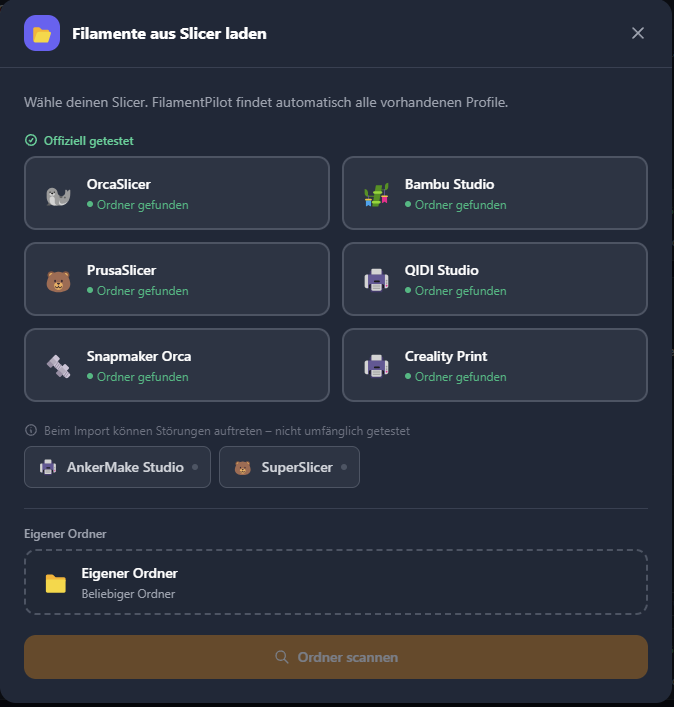
Cross-slicer export
FilamentPilot Slicer
You have a filament profile in FilamentPilot — whether you created it yourself, imported it from a slicer or loaded it from a manufacturer. With one click, FilamentPilot writes the ready-made profile straight into your slicer’s profile folder. No manual transfer, no typos.
The slicer knows the technical parameters. FilamentPilot saves your know-how — build plate, adhesive, nozzle, notes. Everything the slicer doesn’t store.— Jens Kleinheider, founder of machbar 3D and developer of FilamentPilot
Made by a maker.
Made for makers.
FAQ
Frequently asked questions
Is FilamentPilot purely software?
What does FilamentPilot cost?
Do I need an account or internet?
How do I get my licence?
On how many PCs can I use the licence?
Start for free now.
Download the Windows app and save your 3D-printing know-how — free, no account, no cloud.
Try it free